

XP/LVL, etc.
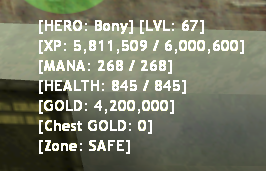
Main attributes are shown on screen: level, experience points, energy, health points, gold, etc. Default position is top-left, default color is yellow (255 255 150). Use the /hud menu to change position, color, style (Standard or Large DHUD), PVP mode (HP + MANA only), and on/off state.
Stat Points
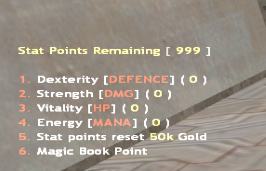
By pressing the M key and selecting "Stat Points", you will be able to see how many statistics points you have and manage them, choosing any of the options: Damage reduction, Strength, Maximum health and Energy.
Skill Points
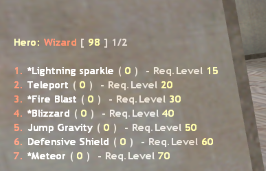
Character abilities can also be managed by pressing the M key and selecting "Skill Points". You can choose from a large number of abilities that you can use against other players, as well as against monsters if your ability is marked with an asterisk (*). Unlocked and improved abilities can be managed by pressing the E key, selecting the desired ability and using the second mouse button (MOUSE2).